Introduction
In today’s digital world, almost everything we do depends on technology. From checking emails and managing bank accounts to running businesses and sharing personal information, we rely on digital systems every day. While technology has made life easier, it has also created new security challenges. Cyberattacks, data breaches, identity theft, and unauthorized access are becoming serious concerns for individuals and organizations. This is where secure access plays an important role.
Secure access refers to the methods, technologies, and policies used to ensure that only authorized people can access specific systems, applications, networks, and information. It protects sensitive data from unauthorized users while allowing legitimate users to perform their tasks safely. Whether you are an individual protecting personal accounts or a company managing thousands of employees, secure access is an essential part of digital safety.
Understanding how secure access works and why it matters can help you make better decisions about protecting your information in an increasingly connected world.
What Is Secure Access?
Secure access is a security approach that controls who can enter a digital system and what they are allowed to do once they are inside. It uses different verification methods, permissions, and security technologies to prevent unauthorized access.
For example, when you sign in to an online banking application, you may need to enter a password and verify your identity through a code sent to your phone. These steps help confirm that you are the account owner. Similarly, employees may need special permissions to access company files, financial records, or confidential business information.
Secure access is not limited to passwords. It can include biometric verification, multi-factor authentication, access control policies, encrypted connections, and identity management systems.
The main goal is simple: provide the right people with the right level of access at the right time while keeping unauthorized users away.
Why Is Secure Access Important?
The importance of secure access has increased as more personal and business activities move online. Cybercriminals often look for weak passwords, unsecured networks, outdated software, and poorly managed accounts to gain entry into systems.
Without proper access controls, sensitive information may be exposed, stolen, changed, or deleted. For businesses, such incidents can lead to financial losses, damaged reputations, legal problems, and a loss of customer trust.
Secure access helps reduce these risks by making it more difficult for unauthorized individuals to enter protected systems. It also gives organizations greater control over how employees, customers, contractors, and business partners use digital resources.
For individuals, it helps protect personal accounts, private conversations, financial details, and digital identities. For businesses, it supports operational security and helps maintain the confidentiality of valuable information.
Although no security solution can eliminate every risk, a well-designed secure access strategy can significantly reduce the chances of unauthorized activity.
Key Components of Secure Access
Several important components work together to create a reliable secure access system.
1. Authentication
Authentication is the process of verifying a user’s identity. It answers a basic question: Are you really who you claim to be?
The most common authentication method is a username and password. However, passwords alone may not provide enough protection, especially when users reuse them across multiple websites.
Modern systems often use additional verification methods, such as one-time codes, authentication applications, security keys, or biometric checks. These methods make it harder for someone to access an account using stolen credentials.
2. Authorization
Authentication and authorization are closely related, but they serve different purposes. Authentication confirms identity, while authorization determines what an authenticated user can access.
For example, an employee in a marketing department may be allowed to view campaign documents but not access confidential payroll records. A system administrator may have broader permissions because of their responsibilities.
Proper authorization limits unnecessary access and reduces the potential damage caused by compromised accounts.
3. Multi-Factor Authentication
Multi-factor authentication, commonly known as MFA, adds another layer of protection to the login process. Instead of relying on a password alone, it requires users to verify their identity through two or more different types of evidence.
These factors may include something a person knows, such as a password; something they possess, such as a security key; or something they are, such as a fingerprint.
MFA is especially useful for protecting email accounts, business applications, cloud platforms, and financial services. Even if a password is stolen, an attacker may still be unable to sign in without the additional verification factor.
4. Access Control
Access control determines which users can enter particular systems and use specific resources. Organizations can assign permissions based on job responsibilities, departments, or individual requirements.
The principle of least privilege is particularly important. It means users should receive only the permissions necessary to perform their work.
By limiting unnecessary access, organizations can reduce accidental data exposure and make it more difficult for attackers to move through compromised systems.
Common Secure Access Technologies
Technology continues to improve the way individuals and businesses protect digital resources. Several solutions are now widely used to strengthen secure access.
Single Sign-On (SSO): Single sign-on allows users to access multiple approved applications through one authentication process. It can improve convenience and help organizations manage authentication centrally.
Identity and Access Management (IAM): IAM systems help organizations create, manage, and remove user accounts. They also support authentication, permissions, and access policies across different applications.
Virtual Private Networks (VPNs): A VPN creates an encrypted connection between a device and a network or service. It can help protect data while using untrusted networks, although it does not automatically make every activity or device secure.
Biometric Authentication: Fingerprints, facial recognition, and other biometric methods can make identity verification more convenient. Their effectiveness depends on the quality of the technology and the security measures surrounding it.
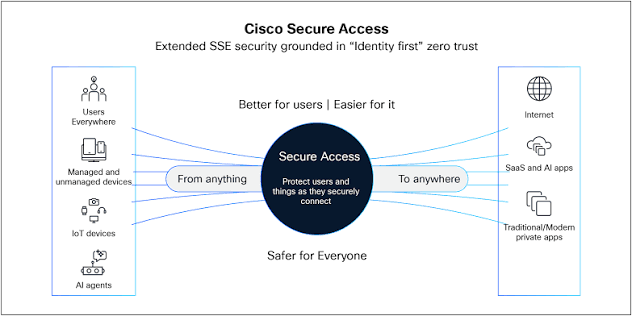
Zero Trust Security: Zero Trust follows the principle of never automatically trusting a user or device simply because it is connected to an internal network. Access decisions are based on identity, permissions, device conditions, and other relevant security signals.
Each technology serves a different purpose. The best solution depends on the organization’s needs, available resources, and level of risk.
Secure Access for Businesses
Businesses handle large amounts of sensitive information, including customer records, employee details, financial data, intellectual property, and internal communications. Protecting these resources is essential for maintaining trust and ensuring smooth operations.
A strong secure access strategy begins with identifying who needs access to particular systems. Companies should create individual accounts for employees, assign appropriate permissions, and remove access when someone leaves the organization or changes roles.
Regular security reviews are also important. Employees sometimes retain permissions they no longer need, creating unnecessary risks. Reviewing accounts and access privileges helps identify these problems before they become serious.
Businesses should also provide cybersecurity training. Employees need to understand how phishing attacks work, why password reuse is dangerous, and how to report suspicious login requests.
Another important step is monitoring access activity. Unusual login locations, repeated failed authentication attempts, or unexpected permission changes may indicate a security problem. Monitoring can help security teams investigate suspicious behavior and respond quickly.
By combining technology, clear policies, and employee awareness, businesses can build a safer working environment.
Best Practices for Improving Secure Access
Improving secure access does not always require expensive technology. Many effective security measures are simple enough for individuals and small businesses to implement.
First, use strong and unique passwords for every important account. A reputable password manager can help create and store complex passwords without requiring you to remember each one.
Second, enable multi-factor authentication wherever possible, especially for email, banking, cloud storage, and administrator accounts.
Third, keep operating systems, applications, browsers, and security tools updated. Software updates often address vulnerabilities that attackers could otherwise exploit.
Fourth, review account permissions regularly. Remove unnecessary accounts and limit access to sensitive information according to actual responsibilities.
Fifth, avoid clicking suspicious links or downloading unexpected attachments. Phishing messages often imitate trusted organizations to trick users into revealing passwords or approving fraudulent sign-ins.
Finally, create a plan for responding to security incidents. Knowing how to disable compromised accounts, reset credentials, notify affected people, and restore access can reduce confusion when a problem occurs.
These practices work best when they become part of everyday digital habits rather than occasional security tasks.
Challenges Associated With Secure Access
Although secure access provides significant benefits, implementing it can present several challenges.
One common issue is balancing security with convenience. If login procedures are too complicated, users may look for shortcuts that weaken protection. Organizations should choose methods that provide strong security without making legitimate work unnecessarily difficult.
Another challenge is managing access across many applications and devices. Large organizations may have thousands of accounts, remote employees, contractors, and cloud services. Without centralized management, permissions can become difficult to track.
Human error is another major concern. Employees may accidentally share confidential files, approve fraudulent authentication requests, or use unsecured devices. Regular training and clear policies can help reduce these mistakes.
Costs and technical complexity can also create difficulties, particularly for smaller organizations. A practical approach is to begin with essential protections, such as MFA, account reviews, software updates, and secure password management, before introducing more advanced solutions.
The key is to treat secure access as an ongoing process that evolves with changing technology and business needs.
The Future of Secure Access
The future of secure access will be shaped by changing cyber threats, cloud computing, remote work, and advances in identity verification.
Passwordless authentication is becoming an important area of development. Passkeys and security keys can help users sign in without relying on traditional passwords, reducing exposure to certain phishing and credential-theft attacks.
Artificial intelligence is also being used to identify unusual login patterns and suspicious behavior. These systems can help security teams detect potential threats more quickly, although their accuracy depends on the quality of the data and the way they are implemented.
At the same time, organizations are increasingly adopting Zero Trust principles and centralized identity management to protect users working from different locations and devices.
Biometric verification and device-based security checks may also become more common. However, privacy, accessibility, and secure handling of identity data will remain important considerations.
As digital services continue to expand, secure access will remain a fundamental part of protecting information and maintaining confidence in online systems.
Conclusion
Secure access is one of the most important elements of modern cybersecurity. It helps ensure that only authorized individuals can use digital systems, protects sensitive information, and reduces the risks associated with stolen credentials and unauthorized activity.
From strong passwords and multi-factor authentication to identity management and Zero Trust security, there are many ways to improve access protection. The right approach depends on individual requirements, organizational size, and the sensitivity of the information being protected.
However, technology alone is not enough. Regular updates, sensible permissions, employee education, and continuous monitoring are equally important for maintaining effective security.
Whether you are protecting a personal account or managing a business network, investing in secure access is a practical step toward a safer digital experience. By adopting reliable security practices today, individuals and organizations can better prepare for tomorrow’s digital challenges.