In today’s fast-paced software development environment, businesses are under constant pressure to release applications quickly while maintaining quality, reliability, and security. DevOps has helped development and operations teams work together more efficiently through automation, continuous integration, and continuous delivery. However, as software delivery becomes faster, security risks can also increase if protection is treated as an afterthought.
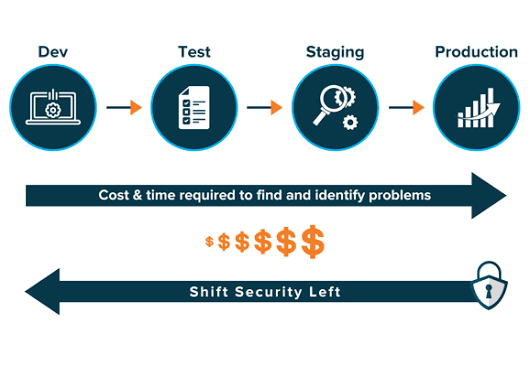
Traditional security practices often involve reviewing an application near the end of development or just before deployment. This approach can create delays because vulnerabilities discovered late in the process may require significant changes to code, infrastructure, or application architecture.
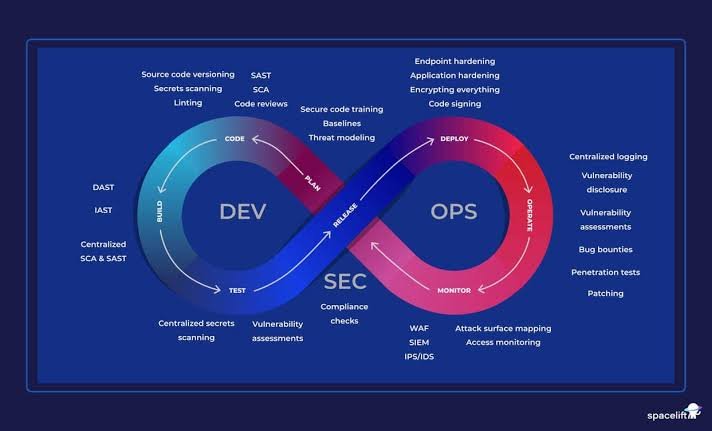
To address this challenge, organizations are increasingly adopting DevSecOps, an approach that integrates security into every stage of the DevOps pipeline. Instead of treating security as a separate responsibility, DevSecOps makes it a shared part of planning, coding, testing, deployment, and ongoing monitoring.
By building security into everyday development workflows, teams can identify vulnerabilities earlier, reduce remediation costs, protect sensitive information, and deliver software with greater confidence.
1. Understand the Importance of Security in DevOps
A DevOps pipeline typically includes planning, coding, building, testing, releasing, deploying, and monitoring software. Each stage introduces potential security risks that can affect the final application.
For example, developers may accidentally expose API keys in source code, third-party dependencies may contain known vulnerabilities, or deployment configurations may leave cloud resources publicly accessible.
If these problems remain undetected, attackers may exploit them to access sensitive information, disrupt services, or compromise business systems.
Integrating security throughout the pipeline helps teams address these risks before they become larger problems. It also reduces the likelihood that security checks will become a last-minute obstacle to a release.
The goal is not to slow development with excessive approvals. Instead, the goal is to automate appropriate security checks, establish clear standards, and help developers resolve issues as early as possible.
This approach works best when developers, security professionals, and operations teams share responsibility for protecting the software they build and maintain.
2. Start Security Planning Before Development Begins
Security should begin during the planning stage, before developers write the first line of code.
At this point, teams should identify the application’s purpose, the data it will handle, the systems it will connect to, and the potential consequences of a security incident.
A practical starting point is threat modeling. This process helps teams identify valuable assets, possible attackers, likely attack paths, and weaknesses that could affect the application.
For example, an application that processes online payments may need stronger protections around customer information, authentication, transaction integrity, and payment integrations than a simple public information website.
During planning, teams should also establish security requirements, define access permissions, identify relevant compliance obligations, and agree on how vulnerabilities will be handled.
Security requirements should be specific enough to guide implementation and testing. Instead of simply stating that an application must be secure, a team might require multifactor authentication for privileged accounts, encryption for sensitive data, and appropriate authorization checks for protected resources.
Useful planning activities include:
- Identifying sensitive data and critical system components.
- Reviewing likely threats and attack scenarios.
- Defining security requirements and acceptance criteria.
- Establishing risk-based vulnerability priorities.
- Assigning responsibility for security-related tasks.
Addressing these questions early helps teams make better architectural decisions and reduces the likelihood of costly changes later.
3. Secure the Source Code Management Process
Source code repositories are a critical part of the DevOps pipeline because they contain application code, configuration files, and sometimes information that could expose internal systems.
If repository access is not properly controlled, unauthorized users may modify code, steal intellectual property, or introduce malicious changes.
Organizations should begin by enforcing strong authentication and limiting repository permissions according to each person’s responsibilities. Multifactor authentication, role-based access control, protected branches, and mandatory reviews for sensitive changes can help reduce risk.
Code review is also an important security practice. Developers should examine changes for common weaknesses, including unsafe input handling, missing authorization checks, insecure error handling, and improper use of cryptographic functions.
Automated tools can strengthen this process. Static Application Security Testing (SAST) tools examine source code or compiled code for patterns associated with security vulnerabilities. These tools can run during pull requests or other stages of continuous integration.
Secret scanning is equally important. It helps detect credentials, access tokens, and API keys that may have been accidentally committed to a repository.
If a secret is exposed, deleting the line from a later commit is not enough. The credential should be revoked or rotated, and the team should investigate whether it was accessed or misused.
By combining repository protections, code reviews, and automated scanning, organizations can reduce the chances of insecure changes entering the development pipeline.
4. Protect Dependencies and Third-Party Components
Modern applications rarely rely entirely on code written by their own developers. They often use open-source libraries, frameworks, container images, and external packages to accelerate development.
Although these components provide significant benefits, they can also introduce security vulnerabilities.
Software Composition Analysis (SCA) tools help identify third-party components and compare their versions against known vulnerability information. These tools can alert developers when a dependency contains a documented security issue or uses an outdated version.
For example, an application may depend on a widely used library that later receives a security advisory. If the affected version remains in production, attackers may be able to exploit the vulnerability.
To manage this risk, teams should maintain an inventory of software components, review dependency updates, and prioritize fixes according to severity and actual exposure.
Automated dependency scanning can be integrated into pull requests and build workflows. Policies can also prevent releases when critical, applicable vulnerabilities remain unresolved, provided teams have a clear process for handling justified exceptions.
Organizations should pay attention to dependency sources as well. Using trusted package registries, verifying package integrity, and restricting the use of unapproved components can reduce the risk of supply chain attacks.
For higher-assurance environments, teams can generate a Software Bill of Materials (SBOM), which records the software components included in an application.
Dependency management is not a one-time task. Components need to be monitored and updated throughout the application’s lifetime.
5. Build Security Into the Continuous Integration Process
Continuous Integration (CI) automatically builds and tests code whenever developers submit changes. Because this stage runs frequently, it offers an excellent opportunity to identify security problems before they reach later stages of the pipeline.
Security checks should be integrated into the CI workflow so that developers receive timely feedback without having to launch separate manual reviews for every change.
Common CI security checks include:
- Static Application Security Testing to identify potentially insecure code.
- Software Composition Analysis to detect vulnerable dependencies.
- Secret scanning to identify exposed credentials.
- Infrastructure as Code scanning to detect insecure configuration.
- License checks to identify dependency licensing concerns where required.
These checks should be configured to provide actionable results. Developers need to understand which component is affected, why the issue matters, and how to resolve it.
However, automatically failing every build for every finding can create alert fatigue. Some findings may be false positives, while others may represent low-risk issues that do not justify blocking a release.
A more practical approach is to define risk-based policies. For example, a pipeline might block a build when a confirmed, exploitable critical vulnerability is introduced, while recording lower-priority findings for scheduled remediation.
Security policies should be reviewed regularly so they remain aligned with the organization’s risk tolerance and application requirements.
6. Secure the Build Environment and Artifacts
Even if the source code is secure, the build process itself can become a target for attackers.
A compromised build system could introduce malicious code, expose credentials, or produce software artifacts that cannot be trusted. For this reason, organizations must protect the systems and processes used to transform source code into deployable software.
Build environments should follow the principle of least privilege. Build jobs should receive only the permissions and credentials they need, and sensitive secrets should be provided through approved secret-management mechanisms rather than embedded in scripts or configuration files.
Where practical, use isolated or ephemeral build environments to reduce the risk of one job affecting another.
Organizations should also control who can modify build workflows, approve releases, and publish artifacts. Changes to pipeline configuration deserve security reviews because these files can influence how software is built and deployed.
Artifact integrity is another important consideration. Teams can use cryptographic hashes, digital signatures, and trusted artifact repositories to help verify that the software being deployed is the software that was built and approved.
Build provenance can provide additional information about how an artifact was produced, including its source revision and build process.
These measures help establish a more trustworthy path from source code to production deployment.
7. Apply Security Testing Before Release
Once an application has been built, it should undergo appropriate testing before it is released to users.
Traditional functional tests confirm that an application behaves as expected, but they do not necessarily identify security weaknesses. Security testing addresses this gap by examining how the application handles malicious input, unauthorized access, and unexpected conditions.
Dynamic Application Security Testing (DAST) evaluates a running application from the outside to identify potential vulnerabilities. It can be particularly useful for finding issues involving web requests, server responses, and application behavior.
Interactive Application Security Testing (IAST), where supported, combines application execution with instrumentation to help identify vulnerabilities while tests are running.
Penetration testing can provide deeper assessment by simulating realistic attack techniques against an application or system within an authorized scope.
Teams should also test authentication, authorization, session management, input validation, file uploads, and access to sensitive resources.
For example, a test should verify that one user cannot access another user’s private records simply by changing an identifier in a request.
Not every test needs to run at the same frequency. Fast automated checks may run on every change, while more extensive penetration tests can be scheduled before major releases or when significant architectural changes occur.
The goal is to combine automated coverage with targeted human assessment so that security issues are identified before software reaches production.
8. Secure Infrastructure as Code and Cloud Configurations
Infrastructure as Code (IaC) allows teams to define infrastructure using version-controlled configuration files. It makes environments easier to reproduce and manage, but insecure configurations can also be repeated across many systems.
For example, a configuration error might create a publicly accessible storage bucket, assign excessive permissions to a service account, or expose an administrative interface to the internet.
To reduce these risks, teams should scan infrastructure definitions before deployment. IaC security tools can identify common misconfigurations involving network access, encryption, identity permissions, logging, and resource exposure.
Organizations should also create reusable, security-reviewed templates for common infrastructure components. This reduces the likelihood that every development team will independently implement security-sensitive configurations.
Cloud permissions deserve particular attention. Applications and automation jobs should use narrowly scoped identities rather than broad administrative privileges wherever possible.
Secrets should be stored in appropriate secret-management systems, and production environments should be separated from development and testing environments according to their risk.
Security checks should run whenever infrastructure code changes, just as application code is tested during CI.
By treating infrastructure configurations as code that requires review and validation, teams can prevent many deployment-related security issues before resources are created.
9. Make Deployment Secure and Controlled
The deployment stage moves software into testing, staging, or production environments. Even when the application itself has passed security testing, mistakes during deployment can expose systems to unnecessary risk.
A secure deployment process should verify that only approved artifacts are released and that the deployment process uses authorized identities.
Role-based access control, protected release workflows, and separation of duties can help prevent unauthorized changes to production systems.
Organizations should also use secure configuration management. Environment-specific settings, credentials, and certificates should be provided through approved mechanisms rather than hardcoded into application packages.
Deployment strategies such as rolling releases, canary deployments, and blue-green deployments can help teams introduce changes gradually and reduce operational disruption. These strategies do not automatically make an application secure, but they can make releases easier to monitor and reverse when problems occur.
Automated policy checks can verify that deployments meet important requirements, such as approved container images, required encryption settings, and appropriate network restrictions.
A rollback plan should be available for deployments that introduce serious defects or security problems. Teams should also define who can authorize emergency changes and how those changes will be reviewed afterward.
The objective is to release software efficiently while maintaining control over what enters production and how it is configured.
10. Monitor Applications Continuously After Deployment
Security does not end when an application reaches production. New vulnerabilities, changing attack techniques, misconfigurations, and suspicious activity can emerge at any time.
Continuous monitoring helps organizations identify potential threats and respond before incidents cause greater damage.
Application and infrastructure logs can reveal unusual authentication attempts, unexpected administrative activity, abnormal traffic patterns, and errors that may indicate exploitation attempts.
Security Information and Event Management (SIEM) systems can aggregate and analyze security events from multiple sources. Runtime Application Self-Protection (RASP), where appropriate, can help detect or block certain attacks from within a running application.
Cloud security monitoring tools can identify risky configurations, exposed resources, and suspicious activity across cloud environments.
Teams should establish clear alerting rules so that important events receive attention without overwhelming responders with unnecessary notifications.
Monitoring should be supported by an incident response plan. This plan should explain how to investigate suspicious activity, contain affected systems, communicate with relevant stakeholders, restore services, and document lessons learned.
Regular vulnerability assessments and patch management are also necessary because new weaknesses may be discovered after a system is deployed.
By combining continuous monitoring with an effective response process, organizations can improve their ability to detect and manage security threats throughout the application’s operational life.
11. Protect Containers and Kubernetes Environments
Containers and Kubernetes have become common components of modern DevOps environments. They help teams package applications consistently and manage workloads at scale, but they also introduce security considerations that need to be addressed throughout the pipeline.
Container security begins with trusted base images. Teams should use approved images, scan them for vulnerabilities, remove unnecessary packages, and rebuild images when important fixes become available.
Containers should run with the minimum privileges required. Avoid privileged containers unless there is a well-justified need, and use appropriate controls to restrict access to the host system and other workloads.
For Kubernetes, teams should enforce suitable permissions through Role-Based Access Control, restrict unnecessary network communication, and protect secrets using approved storage and access mechanisms.
Admission policies can help prevent noncompliant workloads from running in a cluster. For example, an organization may require images to come from approved registries or prevent containers from running with excessive privileges.
Runtime monitoring can provide additional visibility into unusual container behavior and suspicious activity.
Container security should not be treated as a separate task performed only after deployment. Image scanning, configuration validation, access controls, and runtime monitoring should work together as part of the broader DevSecOps strategy.
12. Manage Secrets and Sensitive Information Properly
Credentials are among the most important assets to protect in a DevOps pipeline. API keys, database passwords, cloud credentials, signing keys, and access tokens can provide attackers with direct access to applications and infrastructure if exposed.
One common mistake is storing secrets in source code, configuration files, build scripts, or container images. Even when developers intend to remove them later, secrets may remain in repository history or build artifacts.
A safer approach is to use a dedicated secrets-management solution and provide credentials to workloads only when needed.
Access should be restricted according to job responsibilities, and credentials should be rotated according to risk and organizational policy. Short-lived credentials are often preferable to long-lived static keys when supported by the environment.
Automated secret scanning can detect accidental exposures before changes are merged or released. However, scanning should be combined with preventive controls because no scanner can guarantee that every secret will be identified.
If a credential is exposed, revoke or rotate it promptly and investigate whether it was accessed. Simply deleting the exposed value does not eliminate the risk.
Teams should also protect sensitive information in logs, test data, error messages, and monitoring systems.
Strong secret management helps protect the entire pipeline, from developer workstations to production infrastructure.
13. Make Security a Shared Responsibility
Technology alone cannot create a secure DevOps pipeline. Security also depends on the people, processes, and decisions involved in building and operating software.
In organizations where security is treated exclusively as the responsibility of a separate team, developers may not receive timely guidance, and security reviews can become bottlenecks.
DevSecOps encourages shared ownership. Developers are responsible for writing secure code, operations teams help maintain secure infrastructure, and security professionals provide expertise, standards, and risk guidance.
Training can help developers recognize common vulnerabilities and understand secure coding practices. Security teams can support this effort by creating clear documentation, reusable controls, and automated tools that fit naturally into development workflows.
Organizations should also establish a practical vulnerability management process. Findings need owners, severity ratings, remediation deadlines appropriate to risk, and a documented approach for handling exceptions.
It is important to measure security improvements without encouraging teams to hide problems. A culture that treats every vulnerability as a personal failure can discourage reporting, while a learning-focused culture encourages earlier detection and faster remediation.
When security becomes part of everyday engineering work, it is more likely to remain effective as applications and teams grow.
14. Measure the Effectiveness of Your DevSecOps Pipeline
Integrating security into the pipeline is an ongoing process, so organizations need ways to understand whether their efforts are improving security without unnecessarily slowing delivery.
Useful metrics include:
- Mean time to remediate: How long it takes to resolve identified vulnerabilities.
- Vulnerability recurrence: Whether previously fixed issues reappear in later releases.
- Security test coverage: Which applications, repositories, and pipeline stages are covered by automated checks.
- Critical findings reaching production: How often serious security issues escape earlier controls.
- Secrets detected in repositories: How frequently credentials are exposed and how quickly they are addressed.
- Pipeline feedback time: How long developers wait for security results.
- Exception frequency: How often teams bypass established security policies and why.
Metrics should be interpreted in context. A higher number of detected vulnerabilities does not always mean security has worsened; it may indicate that scanning coverage has improved.
Likewise, a low number of reported findings does not prove that an application is secure.
Use these measurements to identify gaps, improve tooling, and make remediation more efficient. Review them regularly with development, operations, and security teams so that the results lead to practical improvements.
The objective is to make the pipeline safer and more reliable while allowing teams to continue delivering valuable software.
Conclusion
Integrating security into every stage of the DevOps pipeline is essential for organizations that want to deliver software quickly without overlooking the risks associated with modern applications.
By introducing security planning early, protecting source code, scanning dependencies, securing build environments, and testing applications before release, teams can identify vulnerabilities before they become more expensive to fix. Infrastructure validation, controlled deployments, continuous monitoring, and effective secrets management extend these protections into production.
However, DevSecOps is not simply a collection of security tools. It is a way of working that brings developers, operations teams, and security professionals together around a shared responsibility.
The most effective approach is to automate repeatable checks, prioritize risks according to their potential impact, provide developers with useful feedback, and continuously improve the process based on real results.
Organizations do not need to introduce every security control at once. Starting with source code scanning, dependency checks, secret detection, and secure deployment practices can establish a strong foundation. Additional controls can then be introduced according to the application’s architecture, regulatory requirements, and threat profile.
Ultimately, integrating security throughout the DevOps pipeline helps organizations build more resilient applications, reduce avoidable risks, and maintain customer trust while continuing to innovate at speed.